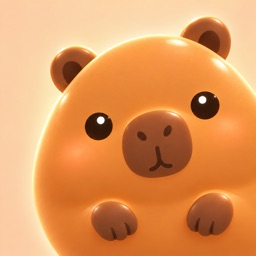
 Jellybara
Jelly notes
What Is a Squishy Game? Press, Stretch and Release
Explore the movement behind a squishy game with Jellybara's four browser-demo textures, real screenshots and a simple comparison you can try yourself.
A squishy game lets you press or drag a character or object and enjoy the way its shape responds. Here, the term describes touch-like interaction and movement, rather than a fixed set of rules about scores or progression. Different games can use it in different ways.
Jellybara's website has a squish test you can try in your browser. Its four texture settings offer a useful way to explore what makes an on-screen character look soft.
What makes something on a screen look squishy?
A dented shape is only part of the effect. Watch how far the character follows your pointer, how it returns after release, and whether it keeps moving afterward.
- Pressing: the point you touch moves inward and the surrounding shape changes.
- Stretching: the character follows as you drag while holding it.
- Recovery and wobble: the shape returns or continues moving after you let go.
Your phone's glass does not become softer. This browser demo compares animated responses; it does not measure the pressure or material properties of a physical squishy toy.
Try these four steps
Open the Jellybara squish test and wait for the character to appear. Start with the Originalbara look so you can also see how the texture settings affect its appearance.
- Press the body briefly, then release.
- Press the same area and drag a short distance sideways.
- Let go and watch until the movement settles.
- Choose another texture and repeat the gesture.
Use a finger on a phone or a mouse on a computer. You can also focus the interaction button and press Enter or Space for a small poke. Dragging the empty space can rotate the character, so aim at the body when comparing stretching.
What to look for in each texture
These images were captured from the public web demo on October 1, 2026, at a 390×844 viewport. With Originalbara selected, we pressed near the middle of the body and dragged roughly 30 pixels to the right. The browser and viewport stayed the same, but the exact moment in the animation was not synchronized. Still images show appearance; try releasing the character yourself to compare recovery.
Jelly: start with the basic press and return
Jelly is the initial setting. It is a useful starting point for learning how a press turns into a change of shape and a return movement. Alternate a short poke with a held drag.

Wobble: watch what happens after release
Look beyond the shape while held and watch the movement after you let go. The current implementation uses different wobble and recovery settings from Jelly. One gesture followed by a pause makes the response easier to observe than constant dragging.
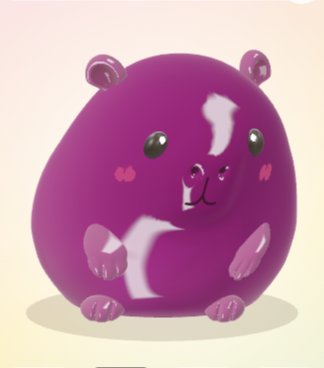
Slime: compare dragging and letting go
Try a small sideways pull and watch how the shape follows and recovers. Change the direction and distance of the drag rather than trying to press your screen harder. This is not a test of the physical pressure of your finger.
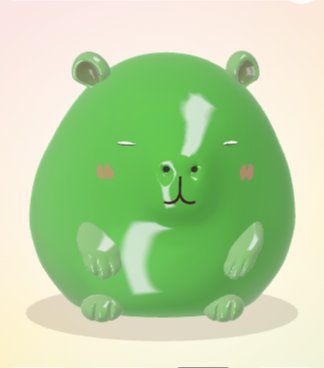
Wax: notice the shell
Wax adds a shell effect that the other textures do not have. Compare a brief press with holding or dragging. The name describes the game's visual response, not a measured hardness rating for a real material.
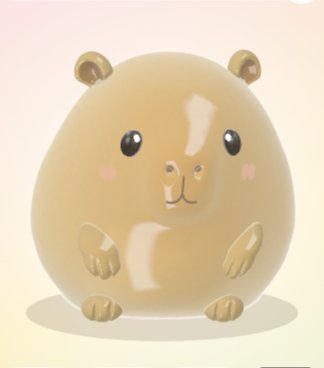
Keep the look and device consistent
Texture and look are separate controls. Keeping the look unchanged while switching textures helps you focus on motion. Then try the same gesture with another look, such as Puddingbara or Kiwibara.
Device performance, viewport size and the part of the character you touch can affect what you see. Compare similar gestures at the same point on one device before drawing conclusions from videos taken on different phones.
Is the web demo the full game?
This guide covers the website's squish test. It does not mean that all features of the main game, such as room decoration or collecting, are available in the browser. The main game is in development as of this article's publication. See the Jellybara game page for its features and release status.
Try pressing Jellybara yourself. For Fruit Café and Color Pong, visit the games page.